Using hasClass(), removeClass(), removeAttribute() Twig methods
In this article, you will learn how to rewrite a Layout Builder section Twig template so that we can implement fixed background images so that they work on iOS.
For how to implement a fixed background for iOS, you can read about that in the iOS solution for Background-attachment: fixed; not working article; in that article, I explain in detail what you need to do.
In this article, we are going to look at how to get values from the attribute object and use Twig conditionals to rewrite the template.
The Drupal UI and Enabling Content Creators
First, I think it is important to point out that we are adding an image to the section using the Layout Builder Backgrounds module and a simple Background Attachment Fixed class checkbox using the Layout Custom Section Classes module.
The modules add a style attribute and a class to the classes attribute respectively, as illustrated below.
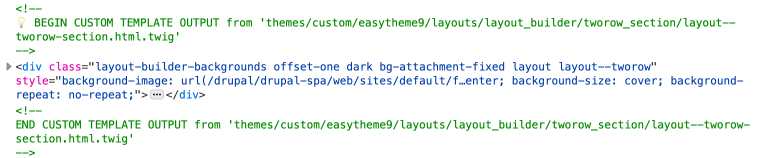
As we discovered in the article, fixing fixed backgrounds for iOS, we need to move the background image to its own isolated element. To do this in Drupal we can use Twig methods and a conditional.
Modify the Layout Template Using Twig
Setting Variables
First, we will check that the background-fixed class is set. We can do this using hasClass() method. If it is set, then we want to set a variable to true, and if it isn't, set the variable to false.
{% set bg_fixed = attributes.hasClass('bg-attachment-fixed') ? 'true' : 'false' %}Next, we want to create a new variable to store the attribute styles.
{% set bg_styles = attributes.style %}Template Modifications
Using our has_bg_fixed variable we can use an if conditional to modify our template.
First, we need to modify the wrapper by removing the styles if the has_bg_fixed is set to true. Else, we can leave it as is. To remove the styles from the attributes we can use the removeAttribute() method and pass in the style value.
{% if bg_fixed == 'true' %}
  <div{{ attributes.removeClass('container').removeAttribute('style') }}>
{% else %}
  <div{{ attributes.removeClass('container') }}>
{% endif %}
For context, we also remove the container class in the above code as we want to add container inside the main wrapper so that the image can be 100 view width and the inner container can have a max-width set. You can read more about that in the Adding new Layout template to Drupal.
Then, we need to add the isolated DIV with the bg_style variable added to the inner DIV style attribute. We only want to add this if has_bg_fixed is set to true, so wrap the DIV in a conditional.
{% if bg_fixed == 'true' %}
  <div class="fixed-bg-wrapper">
    <div class="fixed-bg" style="{{ bg_styles }}"></div>
  </div>
{% endif %}
That's it, now we have implemented our vanilla HTML and CSS solution in Twig. Just make sure you add the CSS to your layouts.css in the theme and modify all your layout templates; I have a one col template, a two col template and a 2 row template that need to be modified.
Summary and Conclusion
In this article, I first discussed what modules are used to allow a content creator to set fixed backgrounds in the Layout Builder UI and also upload a background image.
The in the core of the article, we looked at how we can modify a Drupal twig layout template to implement fixed backgrounds for iOS.
To do this, we used the hasClass() method to check if a bg-attachment-fixed class has been set and if so, set a has_bg_fixed variable to use later in our template. Then, by using dot notation on the attributes object to access the style object, we were able to set a variable with the style.
Finally, with our has_bg_fixed variable we use an if conditional to modify the template if the variable is set to true.
We used the removeAttributes('style') method to remove the style attribute from the outer wrapper and then added the styles to the inner DIV using the bg_styles variable we had set first.
The outcome of this small modification allows us to return the fixed background effect to iOS devices in the Layout Builder enabled theme. If you want to see it in action you can view the demo Coffee Love site.
I hope this article has shown how elegant twig is and how easy it is to modify themes in Drupal using setting values. I write about front-end design and development, sign up to the newsletter below to learn how to design and build sites using modern web technologies.
Thanks for reading
Simon